September 30, 2026 · Moeed
Turnitin AI Detector: How It Works, Accuracy & False Positives
A student uploads a finished essay to a class portal and waits for the instructor’s feedback. Days later, a report…
 Moeed
Read more
Moeed
Read more

Moeed
Content Writer
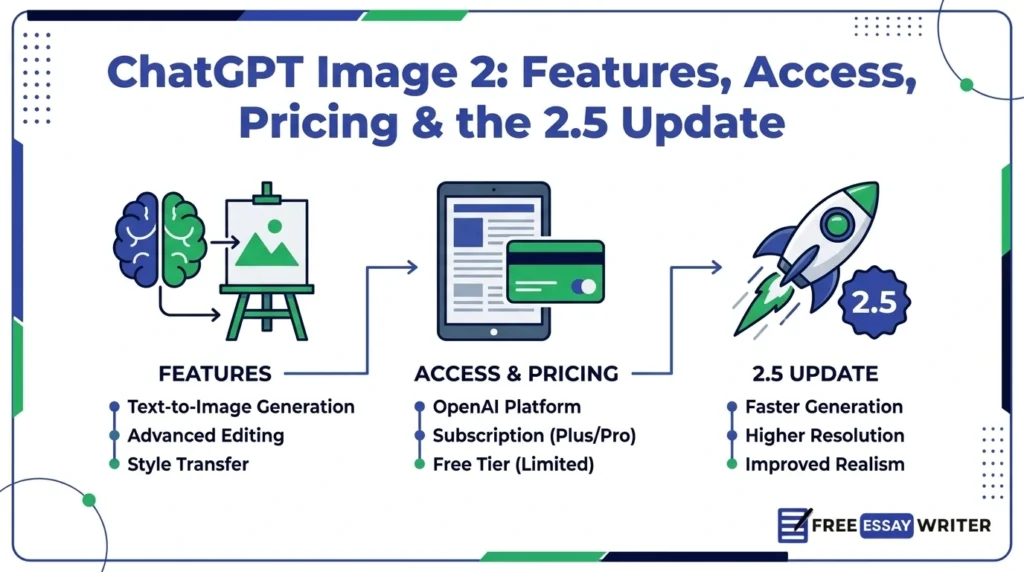
A designer asks an AI tool for a poster and receives garbled letters instead of a headline. That failure defined AI image generators for years, and ChatGPT Image 2 set out to fix it. OpenAI markets the tool as ChatGPT Images 2.0, and developers call the model gpt-image-2.
OpenAI launched the model on April 21, 2026, and released ChatGPT Images 2.5 on September 8, 2026. This guide covers features, access, pricing, prompting tips, and the newer Images 2.5 release.
Outside reports disagree on details such as free access and pricing, so labels show each source.
ChatGPT Image 2 is OpenAI’s April 2026 image model, officially called ChatGPT Images 2.0, with API name gpt-image-2. It renders text more accurately, outputs up to 2K resolution, and offers a Thinking mode for paid plans. OpenAI’s newer Images 2.5 followed on September 8, 2026, and now serves as the latest version.
ChatGPT Image 2 is the April 2026 model; Images 2.5 is the newer September 2026 release.
The table below lists launch facts drawn from OpenAI’s launch page and launch coverage.
| Item | Detail |
|---|---|
| Official name | ChatGPT Images 2.0 |
| API model | gpt-image-2 |
| Launch date | April 21, 2026 |
| Available in | ChatGPT, Codex and the API |
| Resolution | Up to 2K |
| Aspect ratios | 3:1 to 1:3 |
| Images per prompt | Up to 8 in Thinking mode (reported) |
| Thinking mode | Paid plans |
| Text languages | Includes Japanese, Korean, Chinese, Hindi, Bengali |
| Successor | ChatGPT Images 2.5, September 8, 2026 |
Batch size and resolution figures come from launch coverage, so OpenAI’s current help pages deserve a final check.
Thinking mode lets the model plan a composition before it draws a single pixel. Launch coverage says the model checks layout, object counts, and prompt constraints during that planning step. In ChatGPT, this mode also lets the model search the web for current references.
The API exposes three reasoning levels called low, medium, and high, according to launch reporting. Higher levels trade waiting time for layout accuracy, as Noqta describes it.
Reports describe gpt-image-2 as a move away from diffusion toward reasoning-enabled, autoregressive generation. Architecture claims come from outside analysts, so treat them as informed descriptions, not confirmed specifications. One outside report lists a December 2025 knowledge cutoff for the model.
Instant mode delivers the fast path, where a prompt goes in, and an image comes out. Per launch coverage, Thinking mode belongs to Plus, Pro, Business, and Enterprise subscribers.
| Mode | Access | Main traits |
|---|---|---|
| Instant | All ChatGPT users, including free | Fast, one prompt to one image |
| Thinking | Plus, Pro, Business, Enterprise | Planning, web search, batches of up to 8 |
Free users get the quality gains, while paid users get planning, search, and batching.
OpenAI’s launch gallery shows posters, infographics, and magazine spreads with dense, readable text. Developers praised small text and dense interface elements in early posts, according to Noqta. Text accuracy can still slip in small labels, so proofreading remains necessary.
Launch coverage lists Japanese, Korean, Chinese, Hindi and Bengali among the improved text languages. OpenAI’s own gallery also shows Arabic, Cyrillic, Greek and Devanagari letterforms in one poster.
Outputs reach 2K resolution, with aspect ratios from 3:1 to 1:3, according to NYU’s summary. That range covers banners, phone screens, and print layouts, and OpenAI’s gallery includes a print-ready bookmark. One API reseller reports sizes up to 3840×2160, so developers should verify limits in OpenAI’s documentation.
Thinking mode can produce up to eight coherent images from one prompt, according to launch coverage. Characters and objects reportedly stay consistent across the set, which suits comics, storyboards and social series.
The API supports reference-image editing, and one reseller lists up to five input images plus mask inpainting. That reseller also lists transparent backgrounds as unsupported, and OpenAI later cited transparent-background layouts in Images 2.5.
OpenAI’s image models changed quickly, with four major releases between March 2025 and September 2026.
| Model | Release | Notes |
|---|---|---|
| DALL-E 3 | 2023 | Built into ChatGPT; weak text rendering |
| GPT Image 1 | March 2025 (ChatGPT), April 2025 (API) | Native GPT-4o image generation |
| GPT Image 1.5 | December 2025 | Better instruction following and color accuracy |
| GPT Image 2 | April 21, 2026 | Thinking mode, 2K output, stronger text |
| GPT Image 2.5 | September 8, 2026 | Faster generation, Sketch, precise edits |
The pace means version names in older articles can mislead readers about the current model.
Launch coverage says OpenAI scheduled DALL-E 2 and DALL-E 3 retirement for May 12, 2026. Arena reportedly placed gpt-image-2 first with a 242-point lead in text-to-image at launch. Leaderboards move constantly, so that ranking describes launch week and not the present standings.
OpenAI released ChatGPT Images 2.5 on September 8, 2026, to users on every ChatGPT tier. OpenAI says generation latency dropped by up to 50% compared with Images 2.0. Images 2.5 also adds more natural lighting, richer textures, and better subject preservation from reference photos.
ChatGPT gained Sketch, templates, image comments, and shareable prompts alongside the model. Typing @Sketch opens the drawing tool, and templates such as Poster and Merch structure the first prompt.
Developers received two new API models named GPT-Image-2.5 Flare and GPT-Image-2.5 Sunburst. OpenAI calls Flare the default choice for most applications, with higher quality than GPT-Image-2 at 50% lower latency. Sunburst targets premium workflows that need tighter control across edits, at the cost of longer generation times.
Hence, GPT-Image-2 now sits one generation behind the newest OpenAI image models.
Per launch coverage, instant mode reaches every ChatGPT and Codex user, including free accounts. OpenAI’s free tier FAQ lists image creation but warns that limits can change over time. Higher rate limits and Thinking mode come with Plus, Pro, and Business plans.
Plus costs $20 per month and Pro costs $200 per month, according to launch coverage. One outside guide cites a limit of about two images per day on free accounts. The banner inside ChatGPT shows the real current limit, since OpenAI adjusts caps with demand.
Since September 8, 2026, ChatGPT users on all tiers receive the newer Images 2.5 experience. So readers opening ChatGPT today will likely see Images 2.5 instead of Images 2.0.
The gpt-image-2 API bills by tokens, the same metering that OpenAI uses for language models. Third-party trackers list $5 per million text input tokens and $8 per million image input tokens. Output rates appear as $30 to $32 per million tokens, depending on the tracker.
One breakdown estimates roughly $0.21 for a single 1024×1024 image at high quality.
| Quality | Approx. tokens | Approx. cost at 1024×1024 |
|---|---|---|
| Low | 272 | $0.009 |
| Medium | 1,056 | $0.034 |
| High | 4,160 | $0.13 to $0.21 |
Treat every price here as approximate, and confirm current rates on OpenAI’s pricing page.
These steps work in ChatGPT, and the exact menus may change between releases.
Sign in, then visit chatgpt.com/images or start any chat and describe the picture directly. Free accounts receive instant mode, while paid plans add Thinking mode for complex layouts.
State the subject, the format, the text to display, and the visual style in one prompt. Quotation marks around exact wording help the model copy each word correctly. A Sentence Counter shows how many sentences a long prompt contains before submission. In Images 2.5, typing @Sketch lets a rough drawing guide the layout.
Name the aspect ratio, such as square, vertical, or wide banner, before generating. Thinking mode can return up to eight related images, which helps with series and storyboards.
Request one change per message, such as swapping a color or fixing a word. Proofread every word in the final image before sharing or printing it.
These three sample prompts show how format, text, and style details fit into one request.
Design a portrait cafe menu titled “Morning Menu” with six items, warm cream background and clear serif type.
Create a vertical infographic explaining how photosynthesis works, with four labeled steps and simple icons.
Generate four square social posts for a bakery launch, keeping the same mascot and pastel palette throughout.
Launch coverage highlights restaurant menus, manga pages, social batches, and product mockups. OpenAI’s own gallery adds educational infographics, including one that explains Cantor’s diagonalization proof.
Canva integrated gpt-image-2 on launch day and added editable Magic Layers, according to one outside report. Adobe also added the 2.5 models to Firefly, according to OpenAI’s announcement.
Students should check course rules before submitting AI-made images, charts, or diagrams in graded work. Turnitin’s AI writing detector analyzes prose, as explained in the Turnitin AI Detector guide. Captions and alt text inside the assignment still count as writing that instructors review.
OpenAI states that Images 2.5 uses checks on prompts and images to help prevent harmful outputs. The company also continues to use C2PA metadata and invisible watermarking on images from its tools.
C2PA metadata is a provenance record that travels with an image file to show its origin. Editing or screenshotting an image can remove metadata, so invisible watermarks add a second signal.
Text accuracy improved, but small errors can still appear, so proofreading remains necessary. Real-world details, such as logos, prices, and dates, need verification against trusted sources.
Thinking mode adds waiting time, since the model plans before it renders. One reseller reports renders near two minutes for 4K high-quality API requests.
Prompts that copy living artists, brand logos, or real people’s likenesses raise legal and ethical risks. Users should follow OpenAI’s usage policies and the rules of each platform where images appear.
Labeling AI-generated images with the tool name builds trust and satisfies venues that require disclosure.
OpenAI released Images 2.5 on September 8, 2026, so older reviews describe a previous version. Check the publication date on any article before trusting its feature list.
Better text rendering does not guarantee flawless spelling in every language and font. Read each word aloud before publishing a poster, menu, or presentation slide.
A short prompt forces the model to guess format, style, and wording. Even with stronger world knowledge, explicit details still reduce surprises and repeated retries.
Reseller pages and trackers quote different output rates, so quoted costs vary between sources. Confirm current pricing on OpenAI’s own page before budgeting any production project.
Students and freelancers sometimes forget that graded work and client work carry disclosure rules. Ask for written permission and label the tool that produced each image.
Long edit lists raise the chance that the model changes details that should stay fixed. OpenAI says Images 2.5 improved multi-turn consistency, but single focused edits remain safer.
Use this list before generating, editing, or publishing an image with the model:
ChatGPT Image 2 refers to ChatGPT Images 2.0, the OpenAI image model released April 21, 2026. Developers can access the same model through the OpenAI API under the name gpt-image-2.
ChatGPT Image 2 is available to free ChatGPT accounts through instant mode, according to launch coverage. Daily limits apply and change over time, so the ChatGPT banner shows the current cap.
In ChatGPT Image 2, Thinking mode plans the layout and checks the prompt before generating an image. Launch coverage limits it to paid Plus, Pro, Business, and Enterprise plans.
ChatGPT Image 2 outputs up to 2K resolution with aspect ratios from 3:1 to 1:3. One API reseller reports custom sizes up to 3840×2160 through the developer interface.
ChatGPT Image 2 improved text rendering in Japanese, Korean, Chinese, Hindi, and Bengali, per launch coverage. OpenAI’s launch gallery also shows Arabic, Cyrillic and Greek lettering in generated posters.
Launch coverage says ChatGPT Image 2 became the production replacement for DALL-E 2 and DALL-E 3. Reports say OpenAI scheduled the older models’ retirement for May 12, 2026.
Yes, OpenAI released ChatGPT Images 2.5 on September 8, 2026, as the newer version. Compared with ChatGPT Image 2, it adds faster generation, Sketch, templates, and two new API models.
The gpt-image-2 API bills by tokens, and one estimate puts high-quality 1024×1024 images near $0.21. Confirm current rates on OpenAI’s official pricing page before planning a budget.
OpenAI says its image tools use C2PA metadata and invisible watermarking, as stated in the Images 2.5 announcement. Editing or screenshotting an image can strip metadata, so labels should not rely on it alone.
Students can use ChatGPT Image 2 only where the course policy allows AI-generated visuals. Instructors decide the rules, so students should ask and disclose the tool used.
GPT-Image-2.5 Flare is OpenAI’s default API choice, with higher quality and 50% lower latency than gpt-image-2. GPT-Image-2.5 Sunburst trades longer generation time for tighter control across detailed edits.
The points below sum up the main facts about the model and its limits:
ChatGPT Image 2 moved AI images from novelty pictures toward usable posters, menus and infographics. OpenAI’s Images 2.5 release in September 2026 already pushes speed and editing precision further. Readers should confirm which version they use, proofread every generated word, and follow disclosure rules.
Explore more writing guides on Free Essay Writer.

Written by
Part of the Free Essay Writer team, sharing practical advice on writing better essays, faster, and for free.
More from this authorSeptember 30, 2026 · Moeed
A student uploads a finished essay to a class portal and waits for the instructor’s feedback. Days later, a report…
Moeed
Read more
September 26, 2026 · Moeed
Family Tax Benefit comes up often in Australian social policy, economics, and commerce assignments. It’s easy to see why: the…
Moeed
Read more
September 19, 2026 · Moeed
How many sentences is 1000 words? This depends on sentence length, but on average, 1000 words is about 50 to…
Moeed
Read more
Generate a full essay free, then polish it with the built-in toolkit.
Start writing free